
Keywords are the most demanding part of the Google search. In Google, this keyword is one of the key ways to know about the customer’s motive. That’s why it doesn’t matter what you are doing in Google free or paid marketing; you have to think about keywords.
But especially if we talk about Google paid ads campaigns, then yes, here keywords play a really big point. If you want to get a good amount of target traffic in your campaign, then yes, you have to consider good keyword selection. And to get a good keyword, you will definitely have to understand the keyword motive and some more things that will help you to pick the perfect keyword for your campaign. Also at the beginning you will have to understand about your target; if you don’t actually know which type of traffic you need, then it will be hard to pick the right motive to choose a keyword.
But after selecting a perfect keyword, now it’s important to understand in which order you will list your keyword in your Google Keyword section.
Keyword Match Type
The keyword match types in Google Ads regulate how closely a keyword must match a user’s search query in order for your ad to appear.
After selecting keywords, we can’t directly use them in the keyword section; we will also have to understand in which match type we will use them. Because according to our match type, all these keywords will work when someone searches on Google.
But for the match type, we have 5 different Google Ads keyword match types. Let’s explore one by one.
All Match Types:
- Phrase Match.
- Broad Match Modifier (BMM).
- Exact Match.
- Broad Match.
- Negative Match.
We have these 5 types of phrase matches for our Google Ads campaign. We will use this all one by one as per our need. But first, let’s explore an example for all of this.
Phrase Match
Phrase match means your ad will show when someone searches for a phrase that includes the exact words you’ve chosen, in the same order, but they can add words before or after it.
Example: “Web Hosting”
Think this is your selected keyword for Phrase Match, but to write in this match, you have to use these “” symbols before and after your keyword, and then it will work in the Phrase Match type. Like this way, you have to write your keyword in the keyword box.
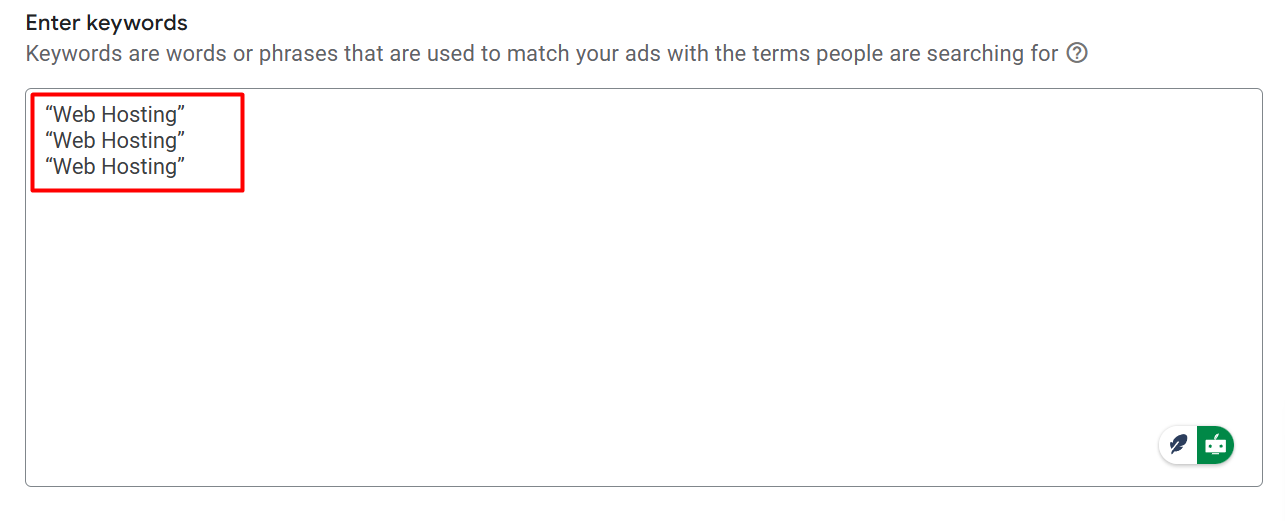
For example, if your keyword is “web hosting,” your ad could show for searches like
- best web hosting.
- affordable web hosting.
- best web hosting in my place.
Because the Phrase Match will only work whenever the search keyword has our main keyword in the same order, “web hosting.” In every search keyword, our main should be in the same order; otherwise, the ad will not show there. If the search keyword look like that,
- best hosting service
- affordable hosting.
For this type of keyword, your ads will not be in infornt of them. If someone searches on Google using a keyword that’s close to your phrase match keyword but not in the exact order, your ad won’t show. Phrase Match only works when the search contains your keyword in the exact order you’ve set, like ‘web hosting’—it must be in that order, but extra words before or after are okay.
Here from our selected keyword “web hosting” should be in the same order. If a keyword just has “web” or someone just has “hosting,” our ads are still not going to show them. Also, in a keyword, if the “web” and “hosting” aren’t placed side by side, then also it will not work.
That means the keyword only works when someone searches a keyword and our selected keyword gets a place in that side-by-side, like this way: “best web hosting.” Then it will work; otherwise, sorry, it will not perform.
Close Variants in Google Ads
We already cover in which position the phrase match keyword works. But we have to know something more: that the Phrase Match will work in the Close variants as well.
Close variants in Google Ads are variations of your targeted keywords that, while not exactly in the same order, are similar enough to cause your ads to appear. Normally Google takes them as close variants if Google sees
Misspellings: Your advertisement may still appear if someone types your keyword incorrectly, such as “jewelry” being typed as “jewelery.”
Singular/Plural: Google Ads is capable of identifying both singular and plural forms. For instance, the terms “glass” and “glasses” would result in the same advertisement.
Stemming: These are different forms of a word, like “shelves” and “shelving.” If your keyword is “shelves,” both would cause your ad to appear.
Acronyms: Your advertisement might still show up if users search using abbreviations, such as “New York City” rather than “NYC.”
Abbreviations: Your ad would still be able to appear if someone typed a short form, such as “department” being searched as “dept.”
Accents: Google also considers accent differences, such as “café” versus “cafe.”
These are crucial considerations. Even though it’s important to have the precise word order for your phrase match keyword, close variants like misspellings, plurals, acronyms, and abbreviations will still cause your ads to appear.
Even if the precise search term isn’t a perfect match, this helps your ads reach a wider audience.
Broad Match Modifier (BMM)
Google Ads’ Broad Match Modifier (BMM) was a kind of keyword match that gave you more control over when your ads appear.
Your ad can appear for searches that contain the keywords with a particular “+” symbol before them, in any order, along with other words, thanks to the Broad Match Modifier.
The search must contain the keyword with the “+” symbol; the order is irrelevant.
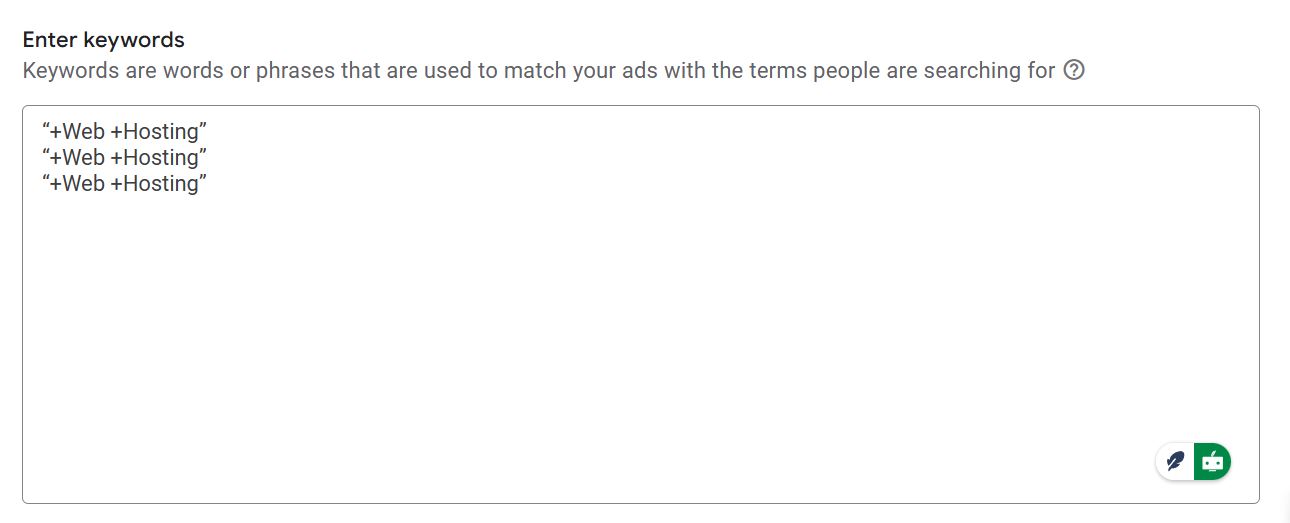
In the way you have to place your keyword in the Google Ads. Then Google Ads will count them as Broad Match Modifier (BMM). Here the interesting thing is that for this match, perfect order is irrelevant.
Example: “+web +hosting”
For Broad Match Modifier (BMM), the key rule is simple: your chosen keyword must appear in the search, but the order doesn’t matter. So, if you set your keyword as +web +hosting, your ad can show up when someone searches for variations like
- Buy web hosting.
- Best web hosting.
even if the words are in a different order. It doesn’t matter if part of your keyword is at the beginning or the end of the search term—as long as both words are there, the ad will show.
- Best hosting in the USA for the web.
- Affordable hosting service for my web.
But if our traffic searches for a keyword like “best hosting,” then the Broad Match Modifier (BMM) will not work because here in the keyword our total selected keyword “+web +hosting” is missing. And this match type also works with their close variants.
Phrase Match + Broad Match Modifier (BMM)
When Broad Match Modifier (BMM) and Phrase Match overlap, it’s usually because Google Ads changed how these match types function.
In order to simplify the process, Google Ads formally merged the Phrase Match and Broad Match Modifier (BMM) in 2021. The flexibility that BMM once offered is now included when using Phrase Match.
Example from the Google support: The Phrase Match keyword “moving services NYC to Boston” will now cover searches like “affordable moving services NYC to Boston” and also searches that used to be covered by BMM, like “NYC corporate moving services to Boston.” Word order still matters, so ads won’t show if the meaning changes, such as for “moving from Boston to NYC.”
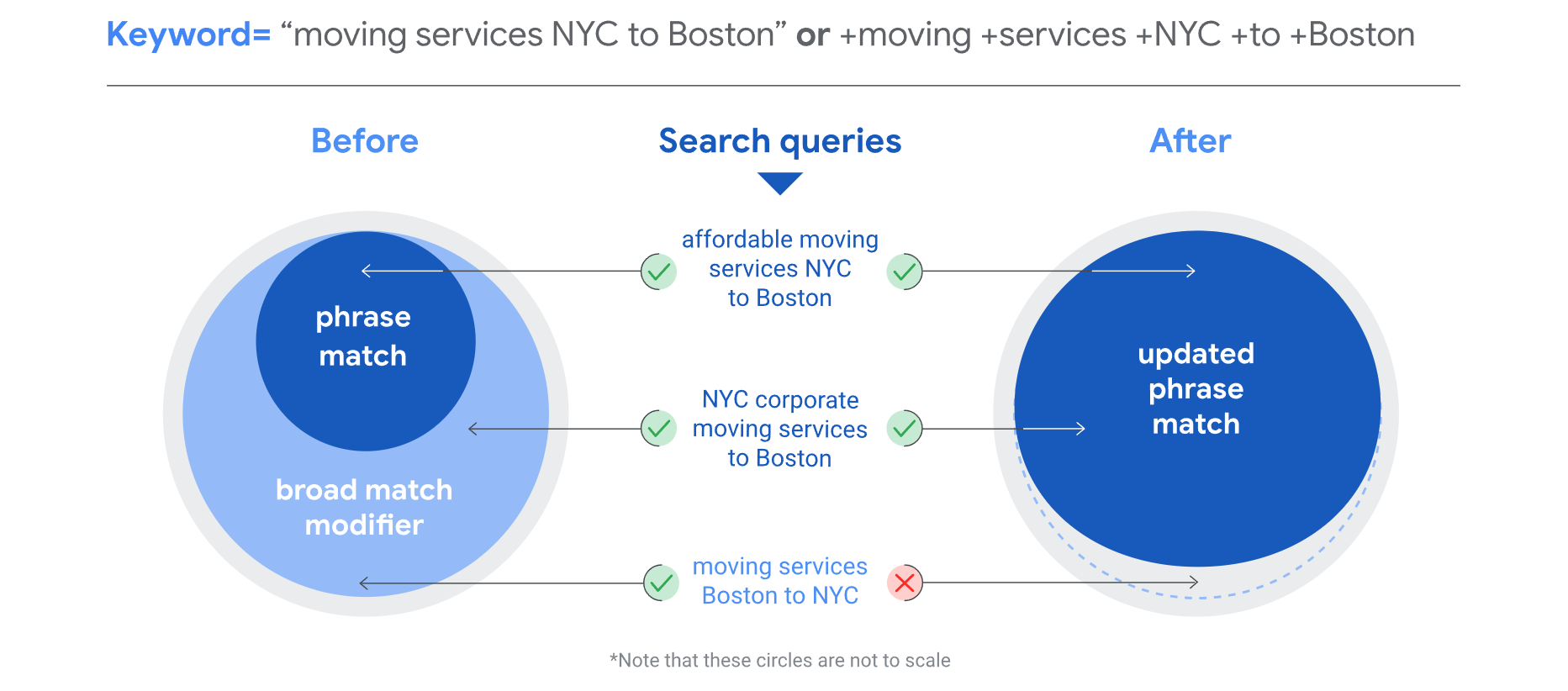
Here in the picture you can check how this new phrase match will work at the time. That’s why in the beginning of Google Ads we used the phrase match keyword maximum time.
Exact Match
I hope already now you can guess what the meaning of “exact match” is in a keyword. Yes, you are right. “Exact match” means your keyword should match exactly in the same order with the search keyword.
Example: [web hosting]
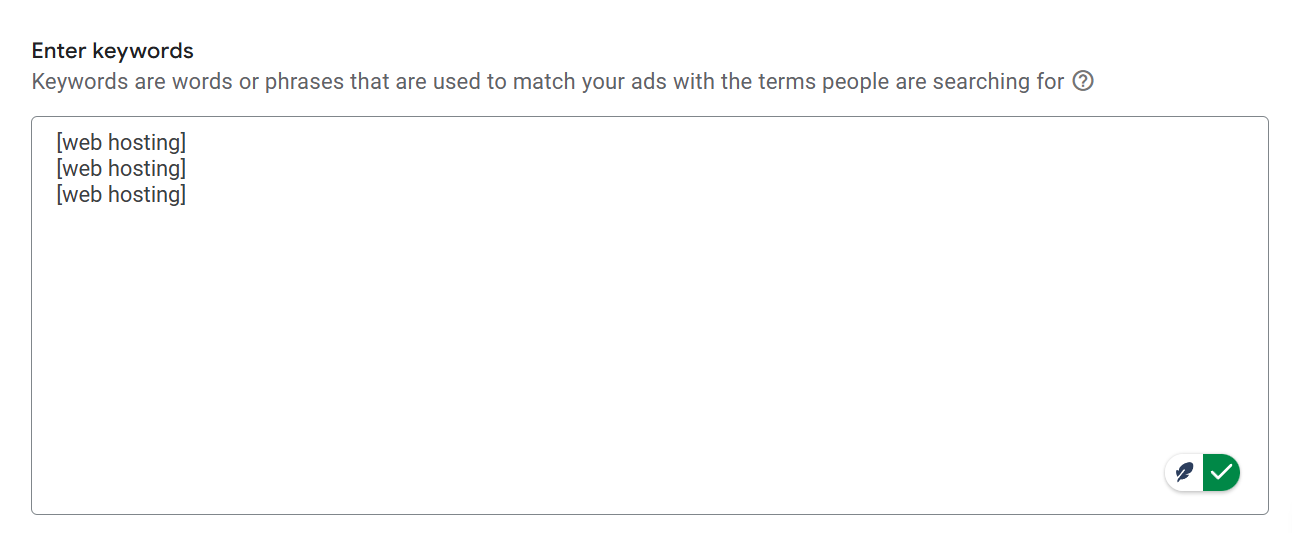
If you put your keyword in this way, then Google will count it as an exact match keyword.
For example, if your keyword is “web hosting,” your ad could show for searches like “web hosting,” but if someone searches “web” or just “hosting” or “best web hosting,” it will not work.
Every time, your ads will show to the traffic if they search the same keyword you picked. Otherwise, for every format of the keyword, your ads will not be in front of them. By the way, don’t forget that this exact match keyword will also work with its close variants.
We normally use this match whenever we show that in this campaign this keyword is performing well. At this time we picked it up and set it up in the exact match, and we increased the ad budget for this keyword to get more good results through this keyword.
Broad Match
The most adaptable keyword match type in Google Ads is called “broad match.” When you select a broad match keyword, your ad will show up for searches that contain your exact keyword along with synonyms, related variations, and even unrelated but still topical searches.
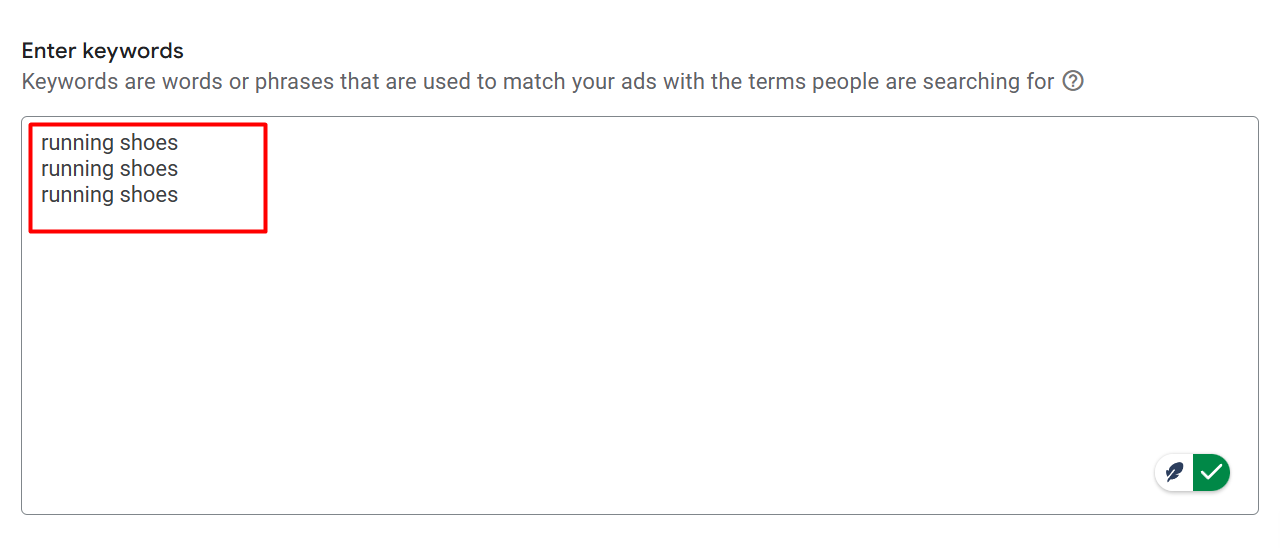
For example, if your broad match keyword is “running shoes,” your ad could appear for searches like “buy sneakers,” “best shoes for running,” or “sports footwear,” even if those words aren’t in the exact order or form.
Reaching a wider audience is Broad Match’s main advantage. You’re more likely to get traffic from people who might not have used your exact keyword but are still interested in your goods or services because it covers a broad range of search queries. This is excellent for raising awareness, particularly if you want to reach a large audience or increase website traffic.
Normally when we used this type of match, we got more keywords. So we start optimizing from time to time to remove the negative keyword from the list after running the ads.
Negative Match
Negative Match in Google Ads helps prevent your ads from showing for irrelevant searches. For example, if you’re selling premium running shoes, adding “cheap” as a negative keyword ensures your ads won’t appear for searches like “cheap running shoes,” keeping your budget focused on the right audience.
You can apply negative matches at three levels:
- Negative Broad Match: Excludes searches that include the negative keyword or its close variations in any order. As, like, broadly, you want to mark this word negative, “free,” then every single keyword will be useless if it contains the word “free” in the keyword.
- Negative Phrase Match: Excludes searches that include the negative keyword in the exact order (with possible other words before or after it).
- Negative Exact Match: Excludes searches that match the negative keyword exactly, with no variations. So after marking a keyword exactly negative for you, then for this exact keyword your ads will go to the front of them.
This is the 5-keyword match that we will always use at the time of our Google Ads journey. Sometimes, for some matches, we will use them according to our needs at the start of the Google Ads, or sometimes we will use them to optimize our ads from time to time.
But always we will have to use the negative match type for our enhanced ads optimization. Because every single keyword can’t be good for us, and for that we can lose our budget.