
The way businesses track marketing conversions has evolved dramatically over the past few decades. Back in the 1990s, the earliest form of web tracking relied on server logs and basic cookies. These tools gave website owners their first real glimpse into visitor activity, but insights were still very limited.
By the 2000s, tracking became more sophisticated with the rise of JavaScript-based tools. This was the era when Google Analytics (originally known as Urchin) became widely adopted, alongside the growing use of third-party cookies. Marketers now had access to deeper behavioral insights, helping them better understand how users interacted with websites.
The 2010s brought a major leap forward with pixel-based and cross-device tracking. Technologies like the Facebook Pixel, Google Ads Conversion Tracking, and remarketing pixels completely changed the game. Marketers could now track specific actions across different devices, personalize ads, and measure campaign effectiveness with far greater accuracy.
2018’s The Privacy Revolution
Around 2018, a major incident shook the digital world when it was revealed that large amounts of user data had been mishandled and shared without proper consent. The news sparked global concern about how personal information was being collected, stored, and used by companies.
Following extensive investigations, regulators stepped in to establish stronger privacy protections. This period marked the beginning of the Privacy Revolution, leading to the introduction of GDPR in Europe, CCPA in California, and later policies like Apple’s iOS 14.5 privacy update. At the same time, businesses began adopting server-side tracking as a more privacy-centric way to measure marketing performance while respecting user data rights.
History of Cookie Consent Banners
Before 2018, most websites freely used cookies to track users without asking for explicit permission. This was the standard practice across the internet, as data collection operated with very little transparency.
The landscape changed in 2018 with the introduction of the GDPR in Europe, which required websites to implement cookie consent banners and clearly inform users about how their data was being used.
In 2020, the CCPA came into effect in California, giving users more control over how businesses collected and shared their personal data. This marked another step toward greater transparency and accountability in digital marketing.
Most recently, in 2023–2024, Google introduced Consent Mode v2 with mandatory TCF 2.2 compliance, pushing marketers toward more privacy-centric conversion tracking. This shift reflects the industry’s ongoing move to balance effective marketing with user data protection
What is TCF 2.2?
TCF stands for Transparency and Consent Framework. The 2.2 version is just the latest update (introduced in 2023).
Think of it like a rulebook for cookie banners. It makes sure websites clearly explain:
- What data they want to collect (like browsing activity or device info)
- Why they need it (for ads, analytics, personalization, etc.)
- Who they share it with (advertisers, partners, platforms)
And most importantly—it gives you, the user, the power to say yes or no.
With TCF 2.2, companies must be more transparent, and users have clearer choices. Google now requires websites and advertisers in Europe to follow these rules if they want to run ads and track conversions.
What Happens If You Don’t Follow Data Privacy Rules?
Data privacy laws like GDPR, CCPA, and the newer Consent Mode / TCF 2.2 aren’t just suggestions—they are legal requirements. If a company doesn’t follow these rules, it can face serious punishments.
🔹 Fines and Penalties: Big companies have already been fined millions of dollars for breaking privacy laws. For example, some tech giants were fined in Europe for collecting user data without proper consent.
🔹 Legal Action: Authorities can investigate and even stop a company from running certain ads or using tracking tools until they fix the issues.
🔹 Loss of Trust: Beyond money, breaking the rules damages reputation. Users lose trust, which hurts business growth long-term.
So far, we’ve seen major tech companies face heavy fines under GDPR in the EU and similar actions under CCPA in the US. These cases show that regulators are very serious about protecting user data.
Google’s Privacy-Focused Data Modeling The Future of Cookieless Tracking
🟢Behavioral Modeling (Blended)
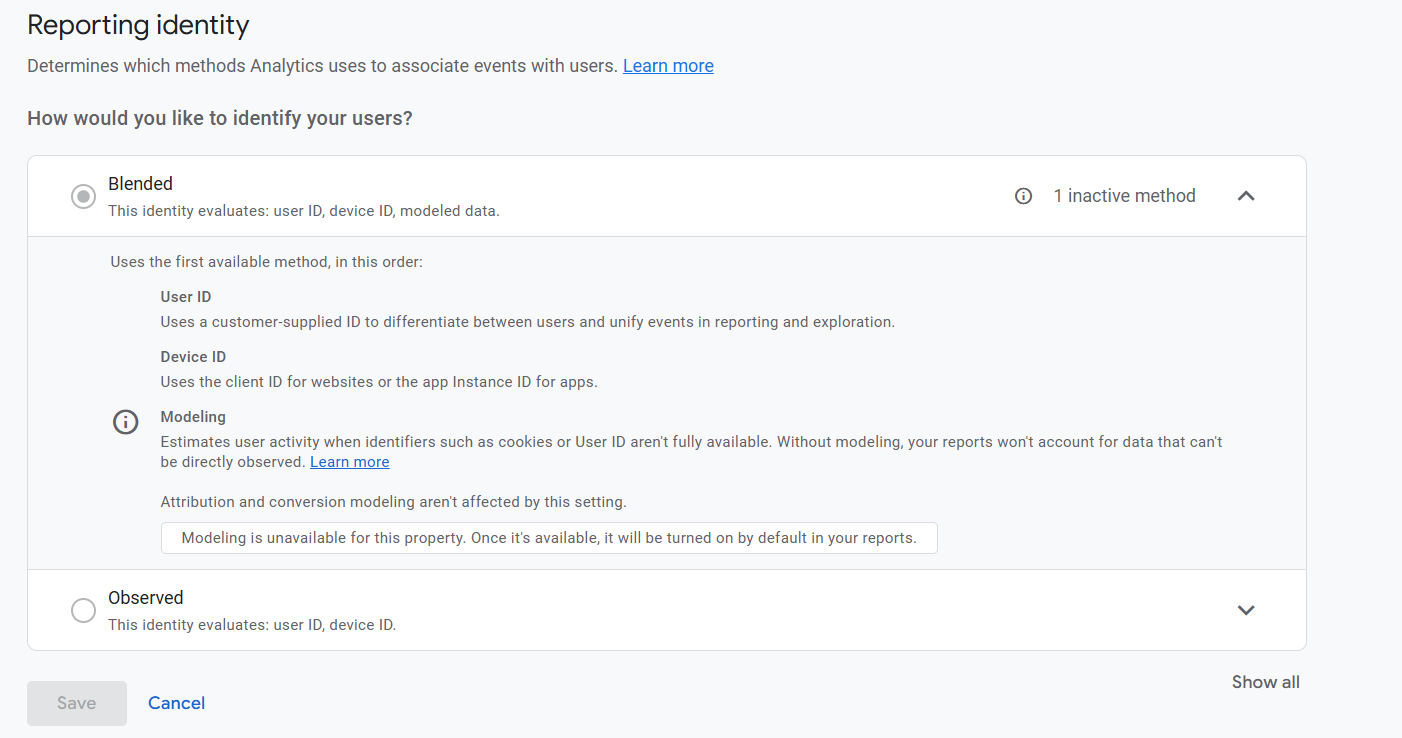
Fills in data gaps when users opt out of tracking. Not everyone allows tracking because of cookie banners or privacy settings. That creates “holes” in your data. The Blended model tries to fill these gaps, so you don’t completely lose visibility into how people interact with your website or app.
Uses machine learning to estimate behavior based on similar user actions For the missing data, GA4 uses machine learning to make educated guesses. It looks at how similar users behave (who did allow tracking) and then estimates what the non-tracked users probably did. This way, you still get a full picture of your conversions and user activity, even if not everyone gives consent.
🟢 Conversion Modeling
Predicts lost conversion data: Sometimes users block cookies or tracking tools, which means some actions, like purchases or sign-ups, aren’t recorded. Conversion modeling estimates these missing actions so you still understand how your marketing is performing.
Helps optimize campaigns: Even with incomplete data, advertisers can make better decisions. The model provides insights that allow campaigns to be adjusted and improved, ensuring ads reach the right audience and drive results.
🟢 Consent Mode Modeling
Consent Mode Modeling is a way for marketers to understand user behavior even when people deny cookie tracking.
Here’s how it works:
- Works without personal data: When users say “no” to cookies, Google cannot see their personal info. Instead, it uses tiny, anonymous signals called cookieless pings. Think of them like gentle “hello” messages from your website; they don’t reveal who the user is but tell Google that someone visited and what actions happened.
- Adjusts campaign performance: By analyzing these cookieless pings along with other data, Google can estimate how well your ads and campaigns are performing. This lets marketers make informed decisions without invading anyone’s privacy.
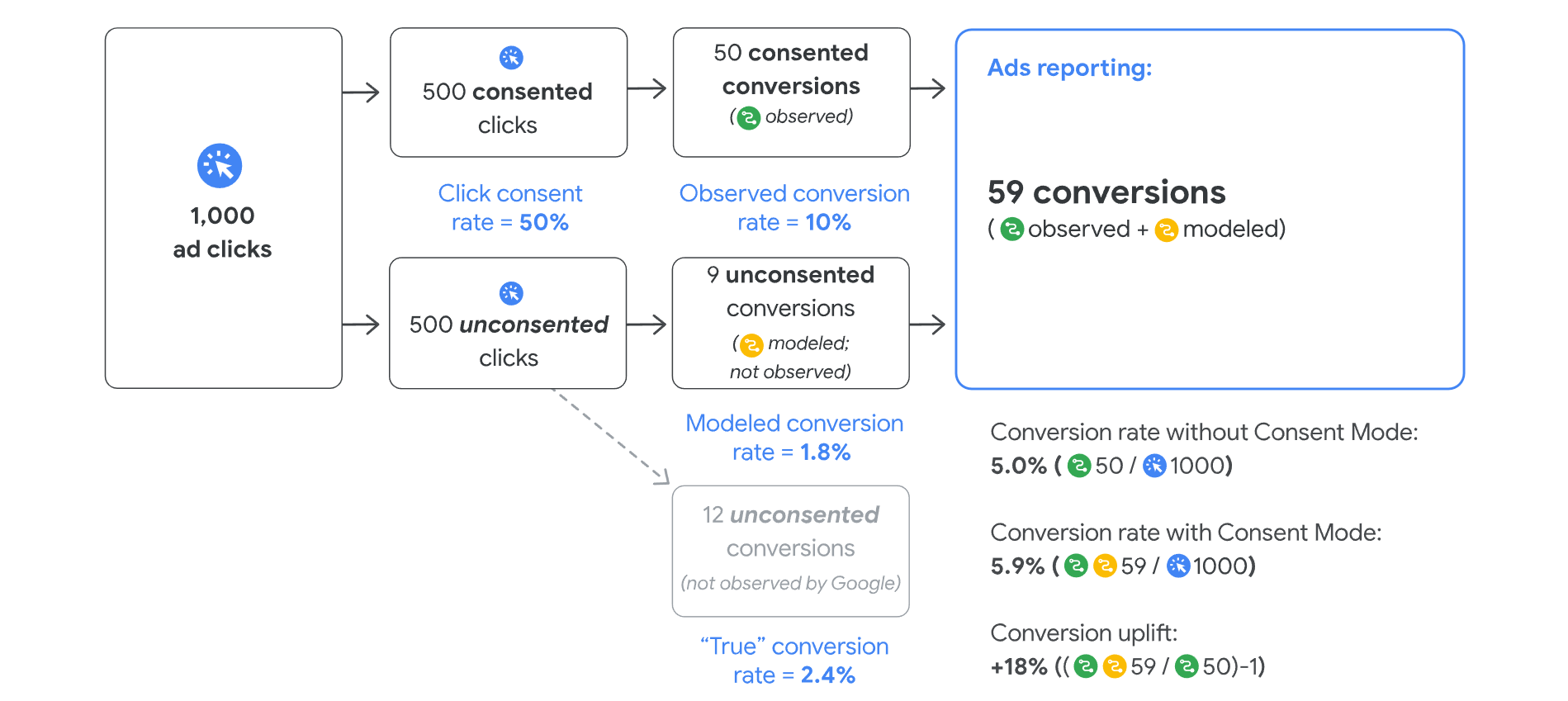
Observed vs Model Data way of calculation
We’re trying to see how many students click on our ad and then sign up for our course. Some students are fine with us tracking their actions (they say “yes”), and some are not (they say “no”).
Step 1: The Consent Breakdown
- 500 students said “yes” to tracking.
- 500 students said “no” to tracking.
Step 2: Observed Data (The “Yes” Group)
- For the 500 students who said “yes,” we can see exactly what they do because they agreed to be tracked.
- Out of these 500 students, 50 students signed up for the course after clicking on the ad. We call this observed data because we can see it directly.
Important: This is the actual data we observe because the students gave us permission to track their sign-ups.
Step 3: Modeled Data (The “No” Group)
- For the 500 students who said “no,” we can’t track them directly.
- But Google doesn’t leave us in the dark. Instead of ignoring them, Google estimates How many of these students probably signed up based on the behavior of similar students who did say “yes”?
- From these 500 students, Google estimates that 9 students signed up, even though we can’t track them directly. This is modeled data.
Important: We can’t see these 9 students directly, but Google makes a smart guess about their actions based on patterns from students who did consent.
Step 4: Total Conversions
Now, we add up everything to find the total number of students who signed up.
- From the 500 students who said “yes,” we had 50 sign-ups (we observed them).
- From the 500 students who said “no,” we estimated there were 9 sign-ups (modeled data).
So, in total, 59 students signed up (50 observed + 9 modeled).
Step 5: Conversion Rates
- Without using Consent Mode, we would only count the 50 sign-ups that we could directly see. This gives us a conversion rate of 5% (50 out of 1,000 clicks).
- But with Consent Mode, we also include the 9 modeled sign-ups, making the total 59 sign-ups. This gives us a conversion rate of 5.9%.
So, using Consent Mode made our conversion rate higher because we included the estimates (modeled data) for students who didn’t consent.
Step 6: The Real (True) Conversion Rate
If we could track every single student, including those who didn’t consent, we could estimate what the “true” conversion rate would be. For example, Google thinks that 12 more sign-ups could have come from the non-consented students if we had full data. This helps us understand how much more successful the ad campaign really was.
Step 7: The Uplift (Improvement)
By using Consent Mode, our conversion rate increased by 18%. That means we saw a better result because we added the modeled data (those 9 estimated sign-ups) into our report.
What is Cookie Consent Mode v2?
An updated version of Google Consent Mode
- GDPR & TCF 2.2 Compliance:
Google’s Consent Mode follows privacy laws like GDPR, ensuring users’ data is protected and tracked only with consent. - Cookieless Pings:
Instead of cookies, Google uses cookieless pings to track conversions. This means no personal data is stored, and privacy is respected. - User Preferences Respected:
If users agree to tracking, data is collected. If they don’t, modeled data is used to estimate conversions without violating privacy.
Why It’s Great:
- More privacy for users.
- Accurate data for advertisers, even without cookies.
- Compliance with privacy laws.
So here in a word, cookie consent helps address privacy concerns by giving users control over their data and limiting third-party tracking. It focuses on first-party data and modeling for analytics, avoiding invasive methods. This ensures businesses can gather insights without violating privacy laws, and it helps maintain GDPR and CCPA compliance, preventing potential legal issues.
Implementation Instructions for Cookie Consent Banner V2
Now this is the part of the implementation. To implement the cookie consent banner, first we have to select one perfect “CMP” partner. also the consent banner should be supportive with To ensure compliance with Google’s policies, it is essential to properly integrate a Consent Management Platform (CMP). Without this, it may become challenging to manage user consent and avoid potential issues. To resolve this, you can find a suitable CMP partner by visiting Google’s CMP Partner Program.
Register with your preferred CMP. Once registered, locate your CMP ID within the CMP Dashboard (we’re using CookieYes as an example here).
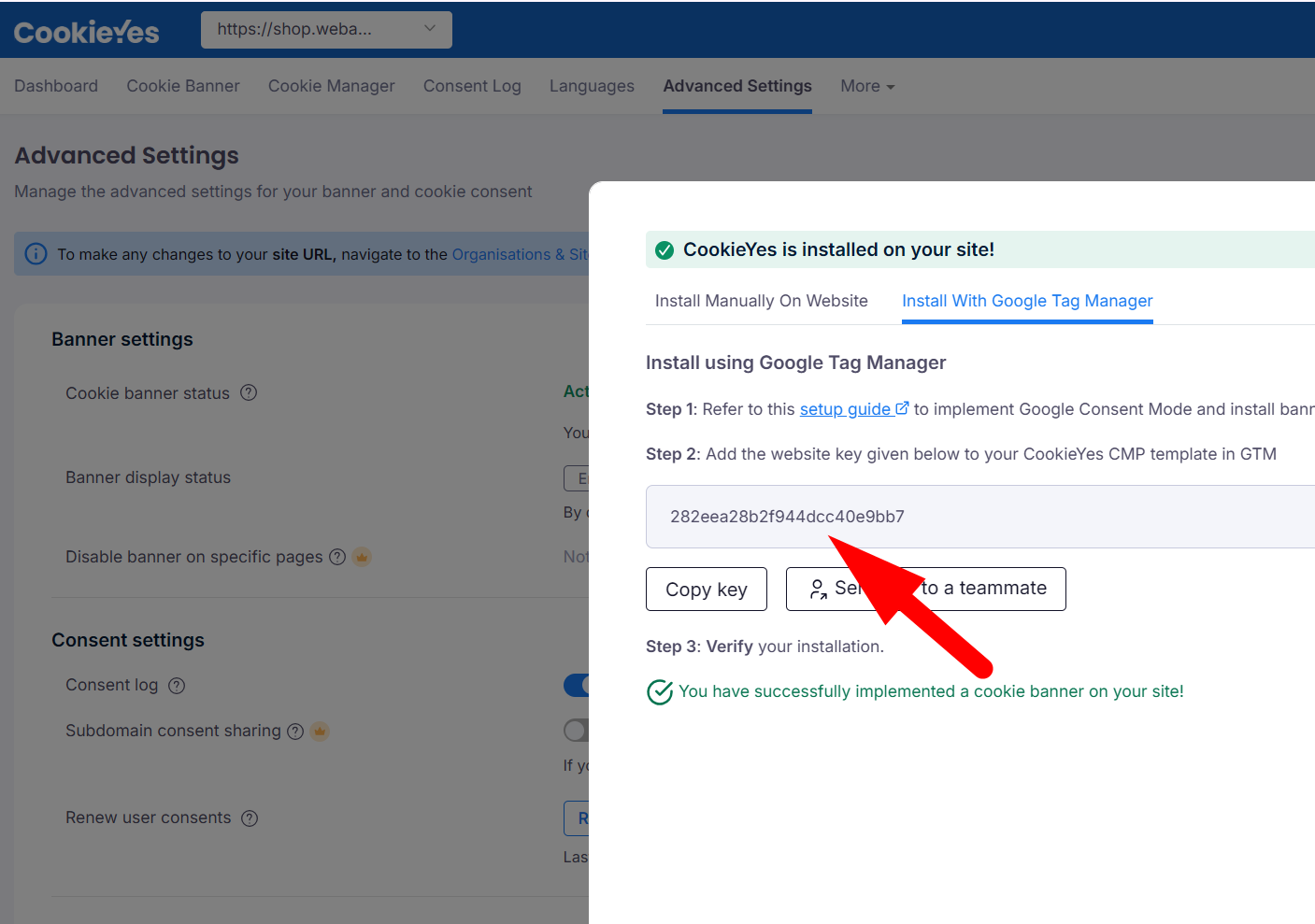
Now please copy the code and come back to the GTM and click on the new tag. Now to select the perfect tag for our work, click on “Choose Tag Type,” then click on the “Template Gallery,” and then search for your targeted “CMP” name.
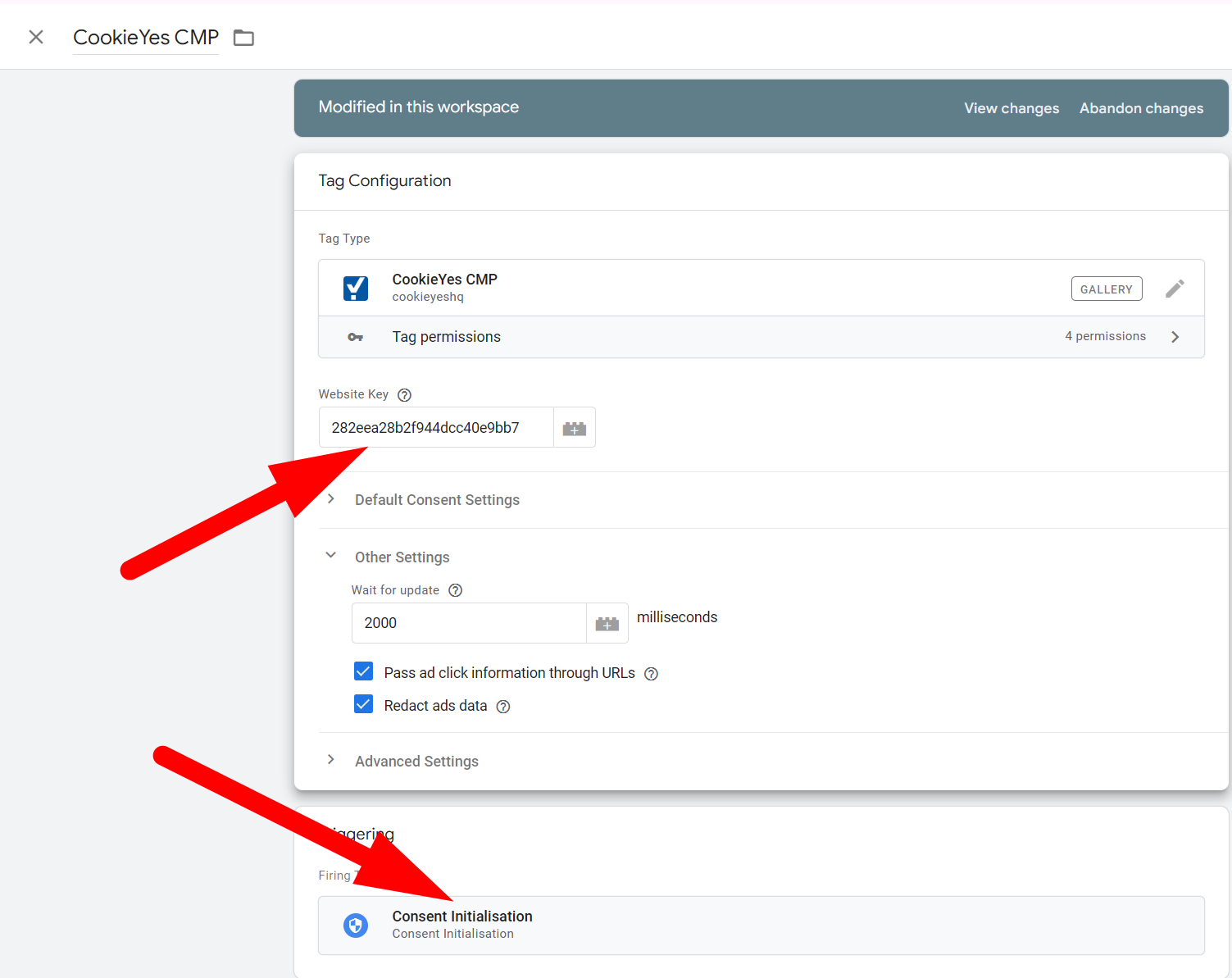
here in the first place, paste your copied code from your “CMP,” and in the trigger section, select “Consent Initialization.” Done.
Basic and Advanced Mode Consent Setup
Now we have to set up every single tag under cookie consent. To do this, first let’s go to the admin section from your tag manager.
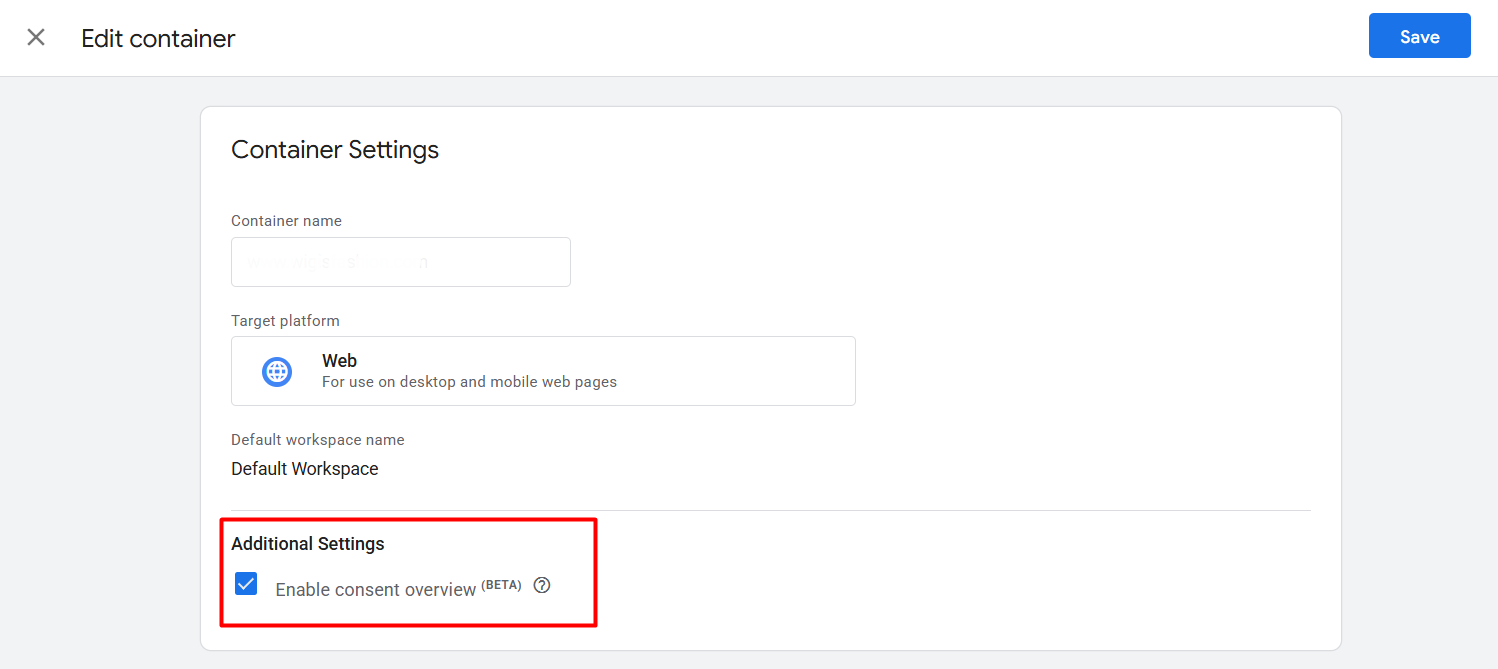
And from the “Container Settings,” please enable the “Consent overview and save.” Now again, get back to the Tag section.

Here in this tag section you will be able to see this option. From here we have to set up our consent. So simply click on it to go to the next step.
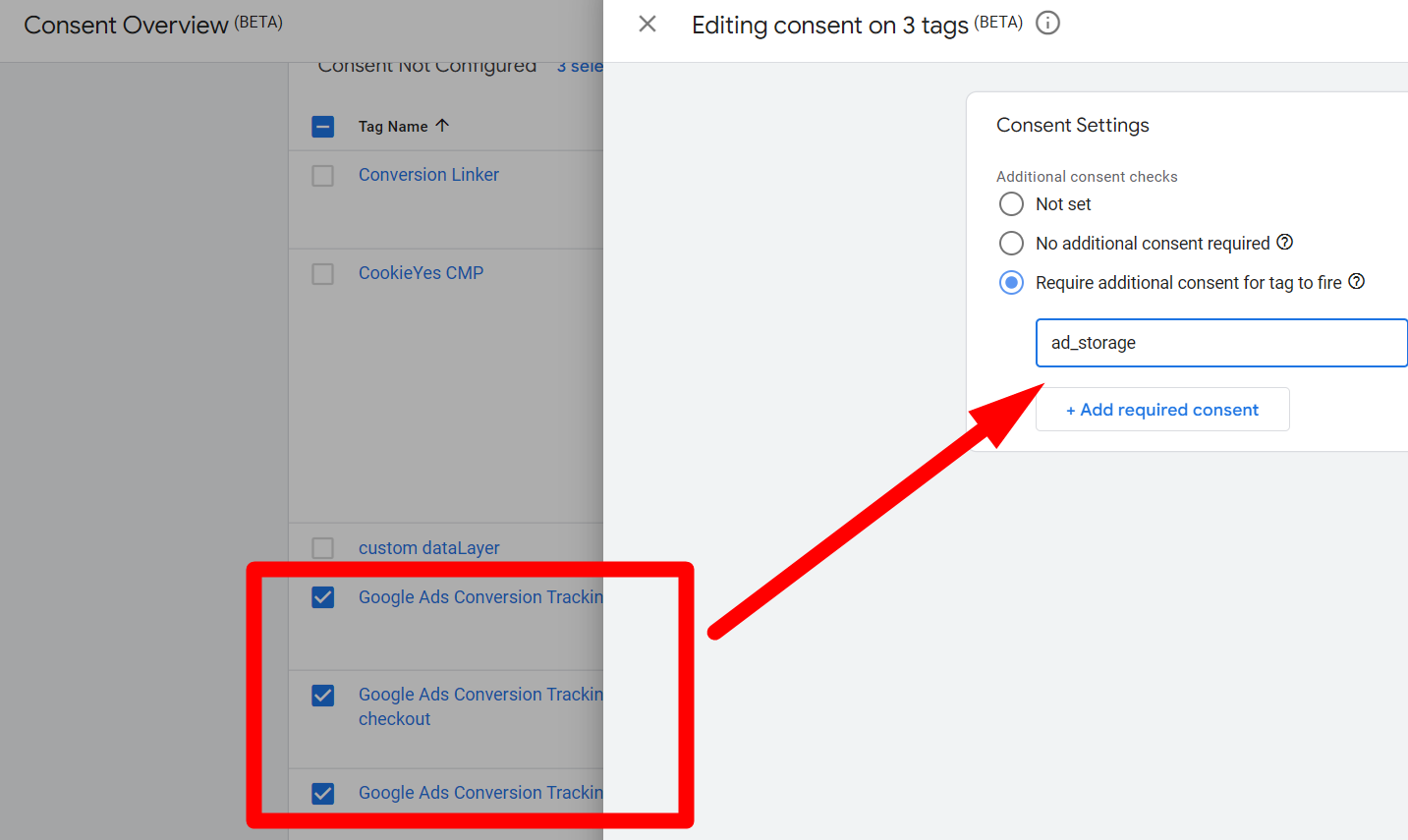
Now, like the way you all select “Google Ads” and set up the consent. By the way every time when you select anything from here, you will get this option.

for setup of additional consent, and like the way for GA4.
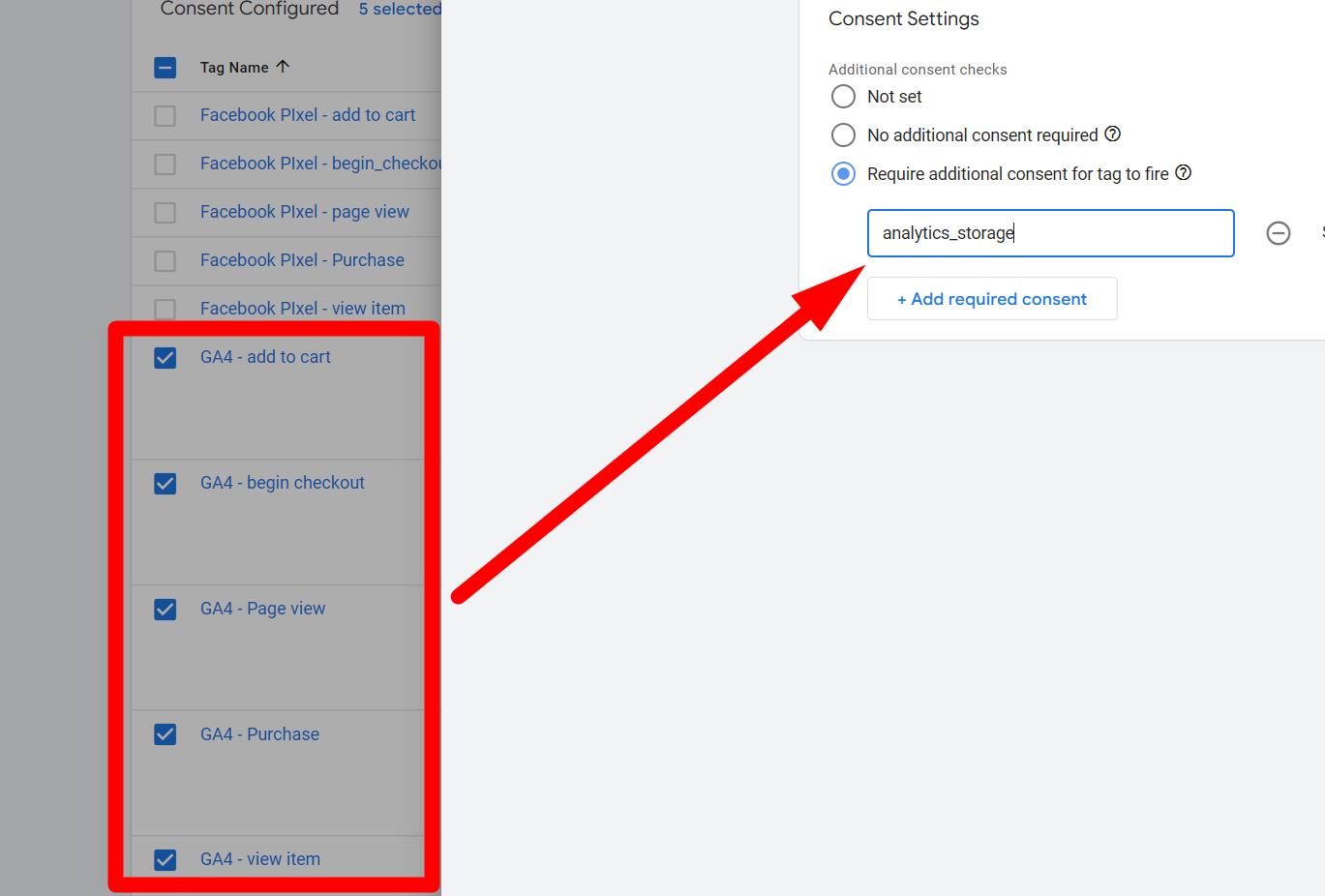
I know you have a question about why we are selecting all of this, so let me explain.
- ad_storage: Controls storage related to ads, like showing personalized ads.
- analytics_storage: Handles storage for website analytics, tracking user behavior for improvement.
- functionality_storage: Stores data that enables site features to work properly, like remembering your preferences.
- personalization_storage: Stores information to personalize your experience, like product recommendations.
- security_storage: Keeps data for security purposes, such as login sessions or protection against fraud.
I hope now everything is clear; now you can select everything as per your target tag.
Advanced Mode Consent Setup
Our basic mode setup is now done. This one is good as per GDPR regulation. But I hope you remember we already talked about Google cookie consent banner v2. This setup is still pending here. If we don’t set this, then Google will not be able to push the cookieless ping, which can be a big problem. Because we already explained that Google tries to track our user data in three ways when someone declines the tracking in the consent banner. And in the position “Consent Mode Modeling” are really important things. So let’s set up the advanced mode consent setup.
Nothing else again. go to your consent setup page and change the setup for “Google ads” and “GA4.”
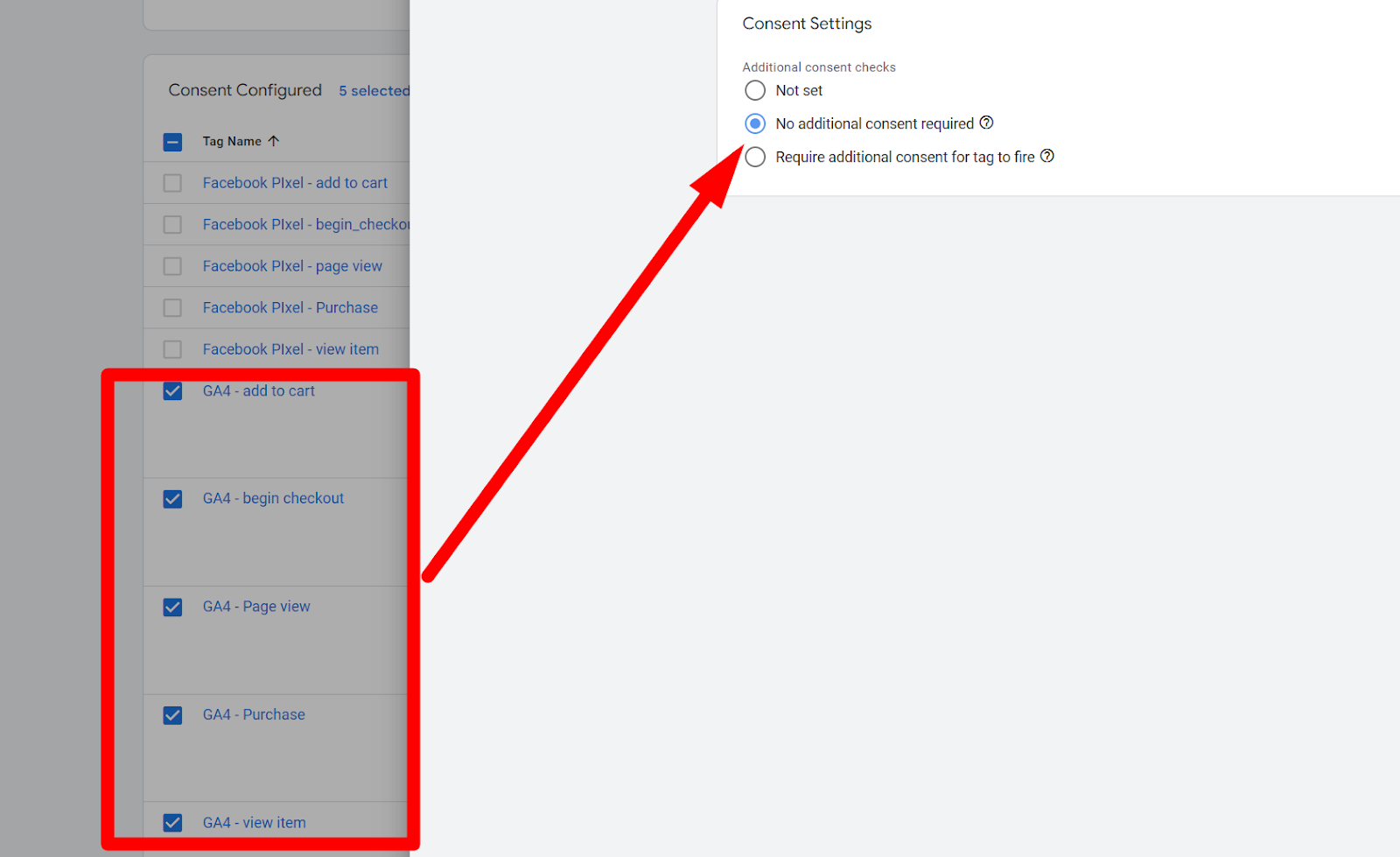
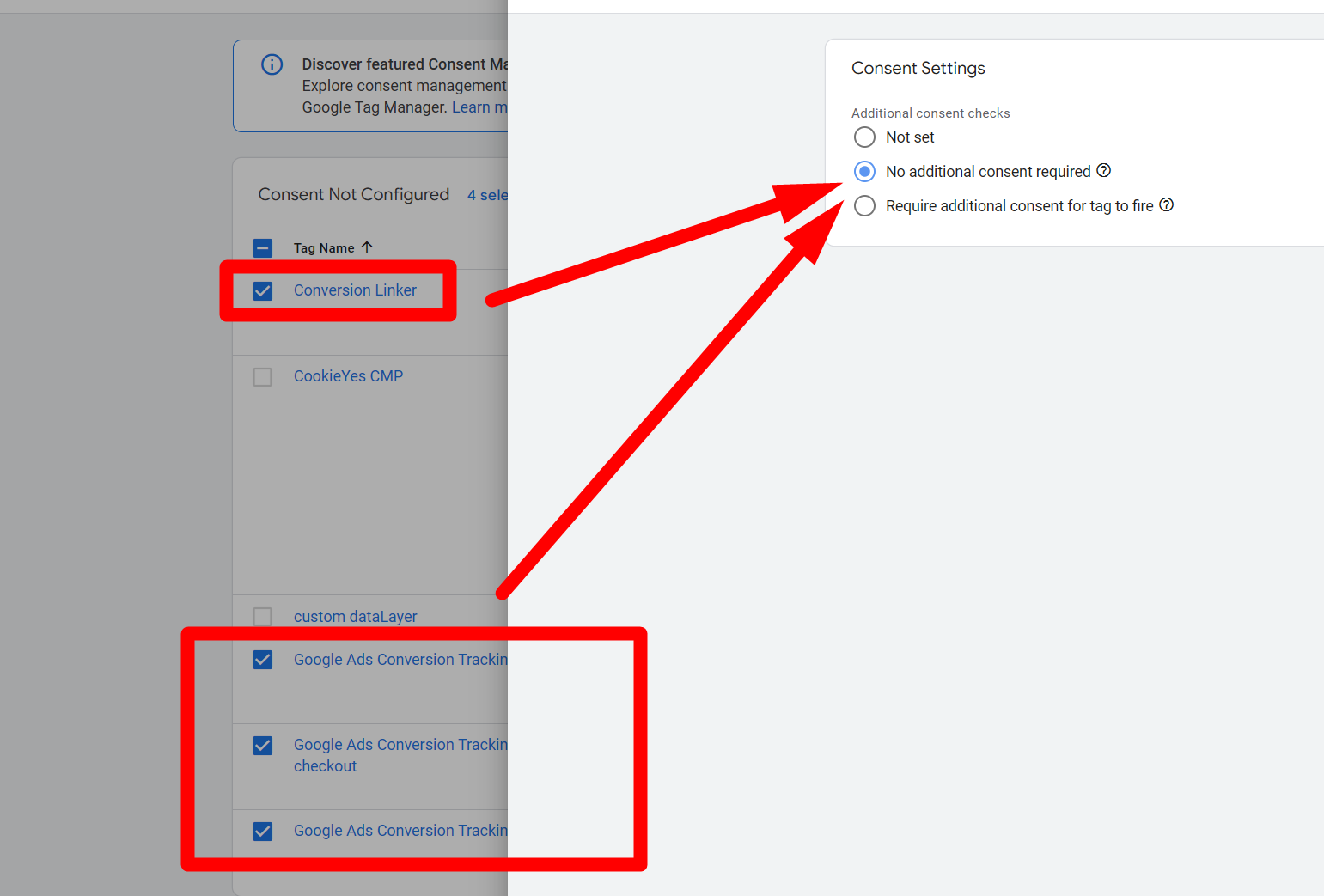
now if someone declines the way to track the activity, then we in GA4 can use the cookieless ping, and you already know what Google will do with that.
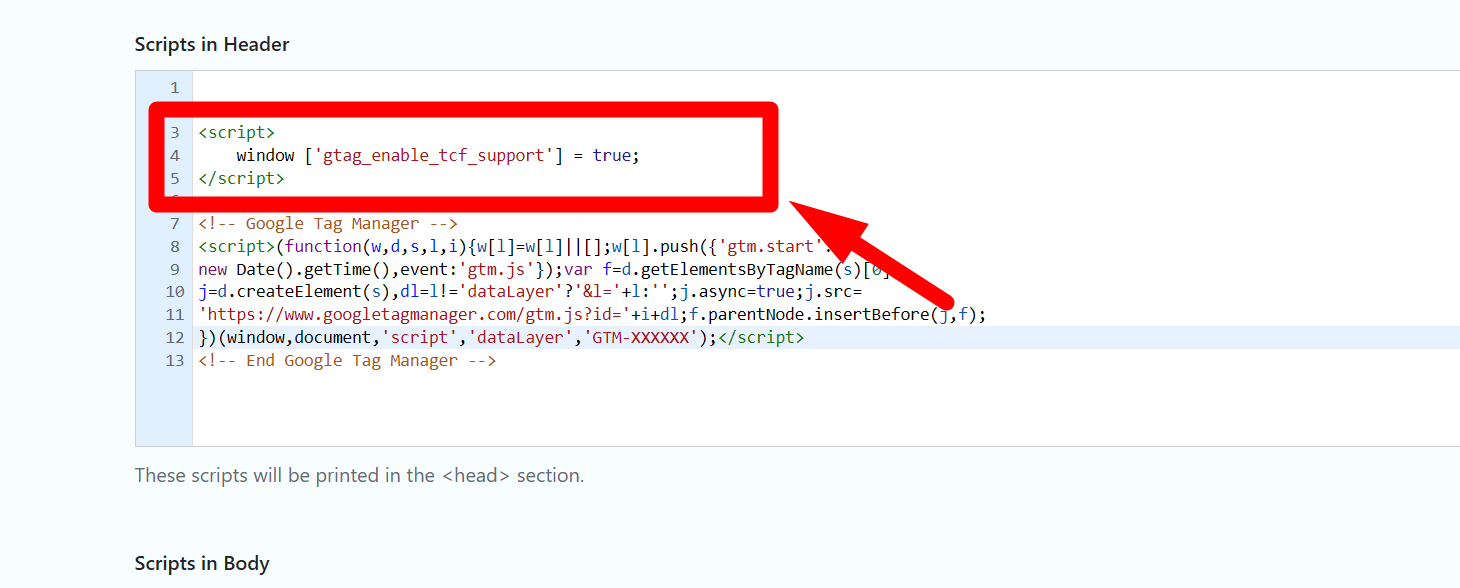
one more single thing add this TCF code before your GTM
<script>
 window ['gtag_enable_tcf_support'] = true;
</script>
When you visit a website, especially in Europe, there are rules that say the website needs to ask you if it’s okay to use your personal data. This is part of privacy laws like GDPR.
Now, the code you mentioned is like a helper that tells Google (through a tool called Google Tag Manager) to check with you first before it starts collecting any data. It’s like a polite “Hey, is it okay if we use your information?” before any tracking or ads start.
Here’s what the code does:
window[‘gtag_enable_tcf_support’] = true; – This bit simply says, “Yes, we’re going to use TCF (which helps with the consent process).”
Well done for staying with us. If you have anything to share with us or if you want to know anything more, don’t forget to talk to us; we are here for you.