Nowadays, managing Google Ads is becoming more and more challenging. Especially in this era of artificial intelligence, or AI, if we cannot organise our advertising strategy, or **ads strategy,** properly, it will be almost impossible to get the desired results. To survive in this competitive market, it is not enough to just run ads but to move forward with the right plan.
Why is Competitor Analysis Important?
The main condition for creating an effective ad strategy is to have a clear idea about your competitors. What kind of offers are they offering, what is their advertising language or messaging, and how are they presenting themselves to customers? Your work becomes much easier if you understand these things. By analysing this information from competitors’ ads, you can easily find the **gap** or gaps in the market. And by using this information, it is possible to create an excellent and powerful ad copy and strategy that will keep you ahead of others.
Google Ads Transparency Center
To simplify this analysis process, Google has given us a wonderful tool called **”Google Ads Transparency Center”**. Using it, you can easily monitor your competitors’ running ads. Through this, you will be able to know:
- Which ads are your competitors currently running?
- Which format (text, image, video) ads are they using more?
- What is the type of their advertising in a particular country or time?
In this article, we are sharing a complete guideline on how to use the Google Ads Transparency Center to make your business promotion more accurate and information-based. If you want to increase the performance of your ad account and create the right strategy, this tool can be one of your mains.
Let’s find out in detail how to use this tool for your work.
Use Google Ads Transparency Center
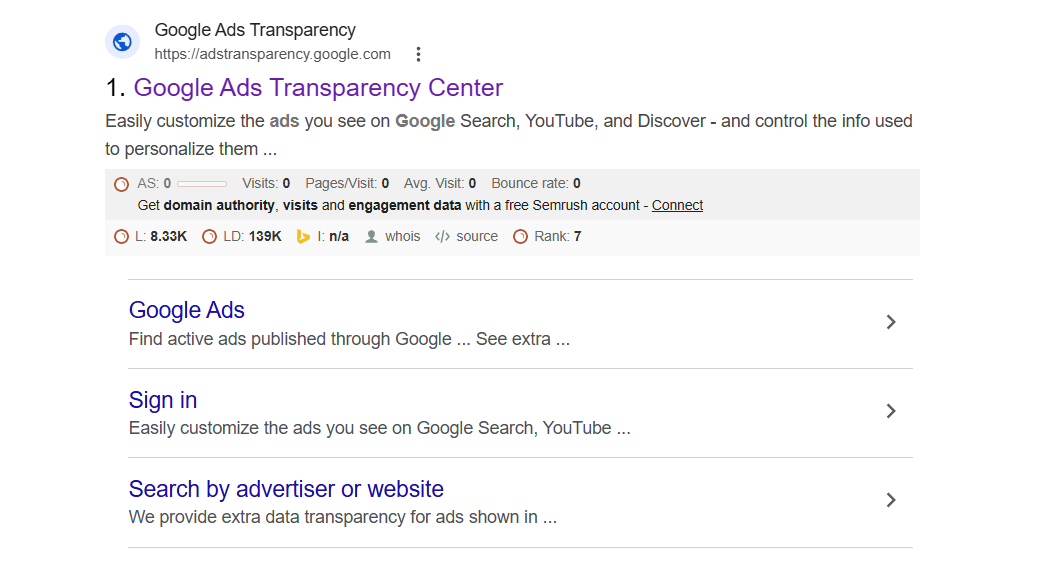
To use this powerful tool, you first need to access its official website. For this purpose, go directly to the Google search bar in your browser and type “Google Ads Transparency Center.” You will find the official link at the top of the search results.
Using Google Ads’ Transparency center
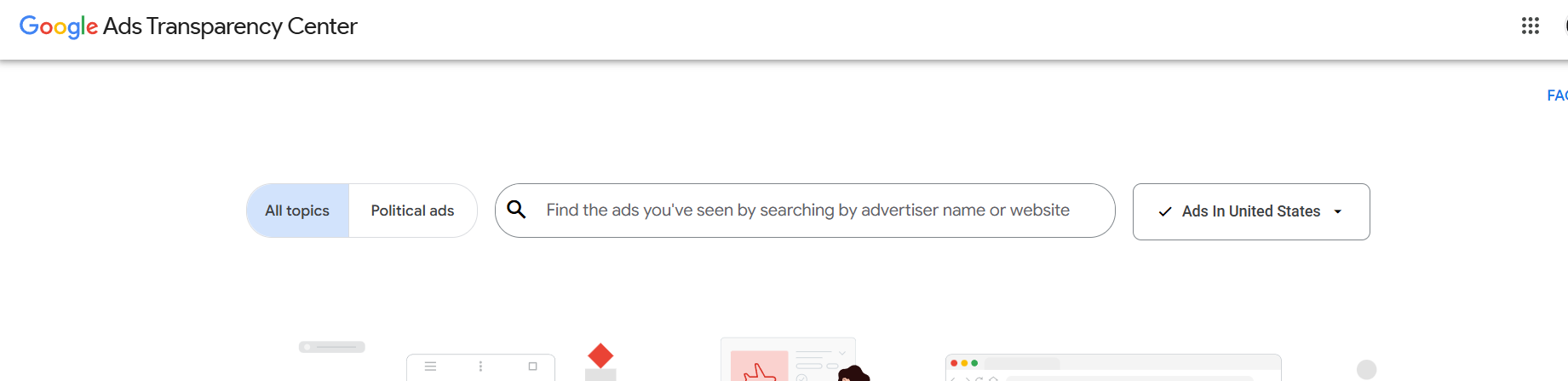
After successfully logging into the Google Ads Transparency Center, you will see a very simple and user-friendly interface (as shown in the image). To find the exact information you want, you need to follow the steps below:
1. Ad Type or Topic Selection:
On the left side of the search bar, you will see two categories:
All topics: This is usually selected by default. Use it to get information about all types of non-political ads, regular or commercial.
Political ads: If you want to see the ads of your competitors’ political campaigns, then you need to select this option.
2. Filtering the right country or location (location filtering):
There is a location dropdown menu on the right side of the interface (for example, “Ads in United States”). Select the exact country in which your competitor is targeting customers. This will help you understand the strategy of a specific market.
3. How to Find Competitors:
The main attraction of this interface is its search bar. Here you can mainly find your competitors’ ads in two ways:
Advertiser Name: If you know the exact name of your competitor’s company, then typing that name and searching will bring up a list of all their running ads.
Website Domain: If you do not get the right results using the company name, you can also search directly using their website URL or domain. This is the most effective way to get accurate results.
This search option lets you quickly see your competitors’ ad types, platforms, and messaging strategies.
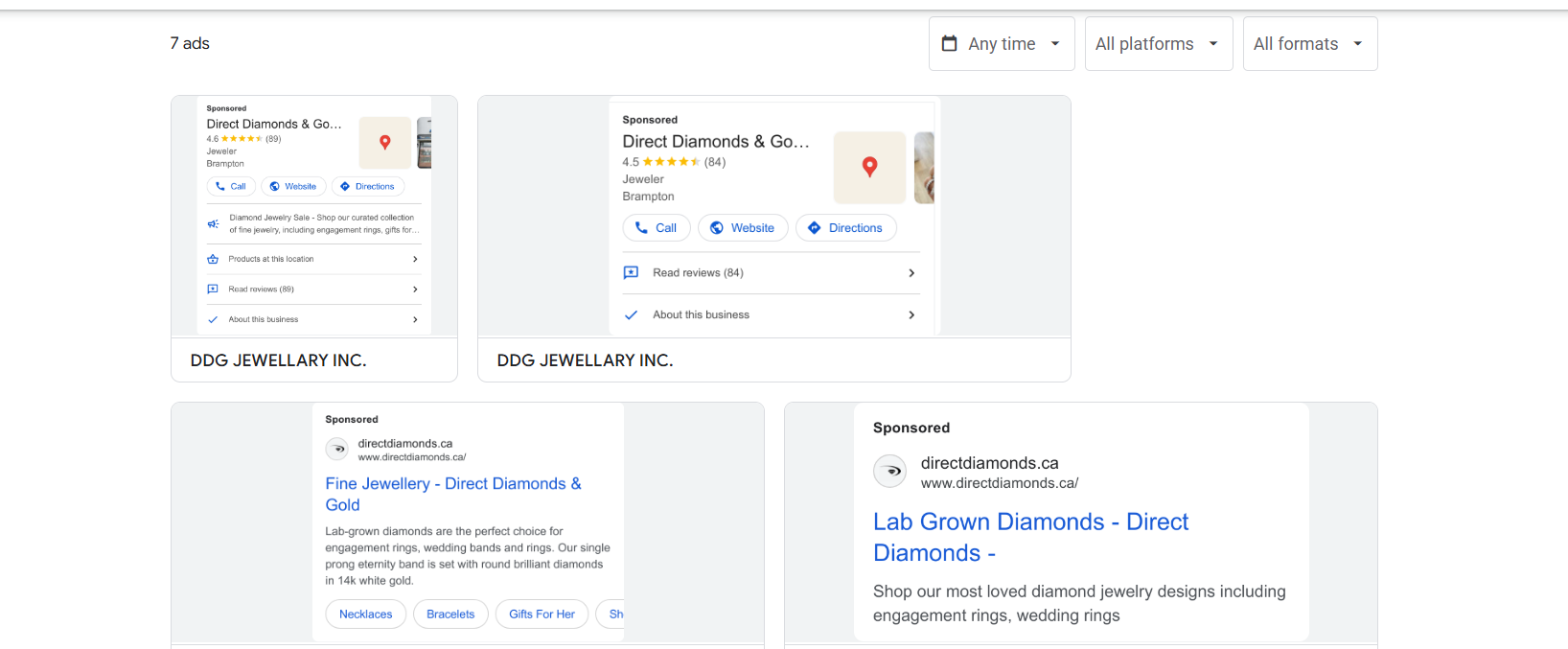
When you search for a specific brand or domain, Google will show you an interface like the one in the image above. Here, we can see the data for a jewelry brand, for example.
Case Study of Ads:
Looking at this screenshot, we can see that we are analyzing ads for a specific jewelry brand (e.g., Direct Diamonds & Gold), which they are currently running in the United States. From here, you can easily note the following important things:
Ad Format: Are they using only text ads, or are they also using image and location extensions? As you can see in the image, they are giving a lot of importance to Google Maps or location-based ads, as well as running search campaigns.
Ad Copy & Offers: What are they saying in their headlines? For example, “fine jewelry” or “lab-grown diamonds.” From this messaging, you can understand what specialty they are attracting customers towards.
By understanding your competitors’ advertising styles and the types of solutions they offer to customers, you will be able to create a more unique and effective **ad strategy** for your own business.
Filter in Google ads Transparency Center

The most powerful aspect of the Google Ads Transparency Center is its **filter** options. Sometimes, a big brand runs a lot of ads at once. The following filters will work like magic to help you find the information you need from that crowd:
1. Time Selection – Any time:
With this filter, you can view ads according to a specific time. Suppose you want to know what kind of offers your competitor gave in the last 30 days or on a specific festival (Black Friday). Using this time section, you can easily catch their seasonal strategy.
2. Platform-based analysis (All Platforms):
Google Ads is not limited to search engines. Using this filter, you can see how they are performing on different platforms. For example:
Google Search: This is the most popular medium. Here you can see what kind of headlines or descriptions your competitors are using to stay at the top of the search results.
YouTube: This platform is the best place for video marketing. It is possible to see directly from here what kind of video ads they are creating and how they are attracting viewers.
Google Maps: This tool is essential for local businesses. If your competitor wants to bring customers to the store in a specific area through maps (for example, “jewellery store near me”), then you can see their ads here.
Google Play: If your competitor is promoting a mobile app or game, then you can analyze their ad type on the Google Play Store here.
Google Shopping: This is the heart of e-commerce businesses. You can get detailed data on which product images they are using and what kind of prices or offers they are displaying directly in search results from this filter.
3. Format Selection (All Formats):
Not all ads are the same. Using this option, you can separate the ads according to format. For example, if you want to research only video ads, you can select ‘Video’ from here. Apart from that, there is an opportunity to view the image or plain text formats separately.
If your competitors are running multiple campaigns at the same time, using these filters will help you easily understand which product or service they are currently spending the most budget on. This will directly help you adjust the budget and format of your campaign.
The End
Ultimately, it is almost impossible to succeed in today’s highly competitive digital market by running ads based solely on guesswork. Especially in this era of AI or artificial intelligence, data or information is the real power. By using the Google Ads Transparency Center, you are not only seeing your competitors’ ads, but you are also analyzing their marketing thinking and future plans.
Which platforms your competitors are more active on, what kind of offers they are offering, or what kind of ad formats (search, video, or map) they are using to win the hearts of customers, each of these pieces of information will help you create a strong ad strategy for your own business. If you want to use your advertising budget correctly and reduce unnecessary costs, it is essential for you to use this tool regularly.
Remember, smart marketers don’t just advertise; they constantly monitor the market and competitors and change their strategies. Hopefully, this guide of ours will help you achieve your business goals and stay a few steps ahead of others using the Google Ads Transparency Center.