We always try to make a great headline and description for our Google Ads copy. That can match our customer search query and our selected keyword list. But still every time we feel that we missed something.
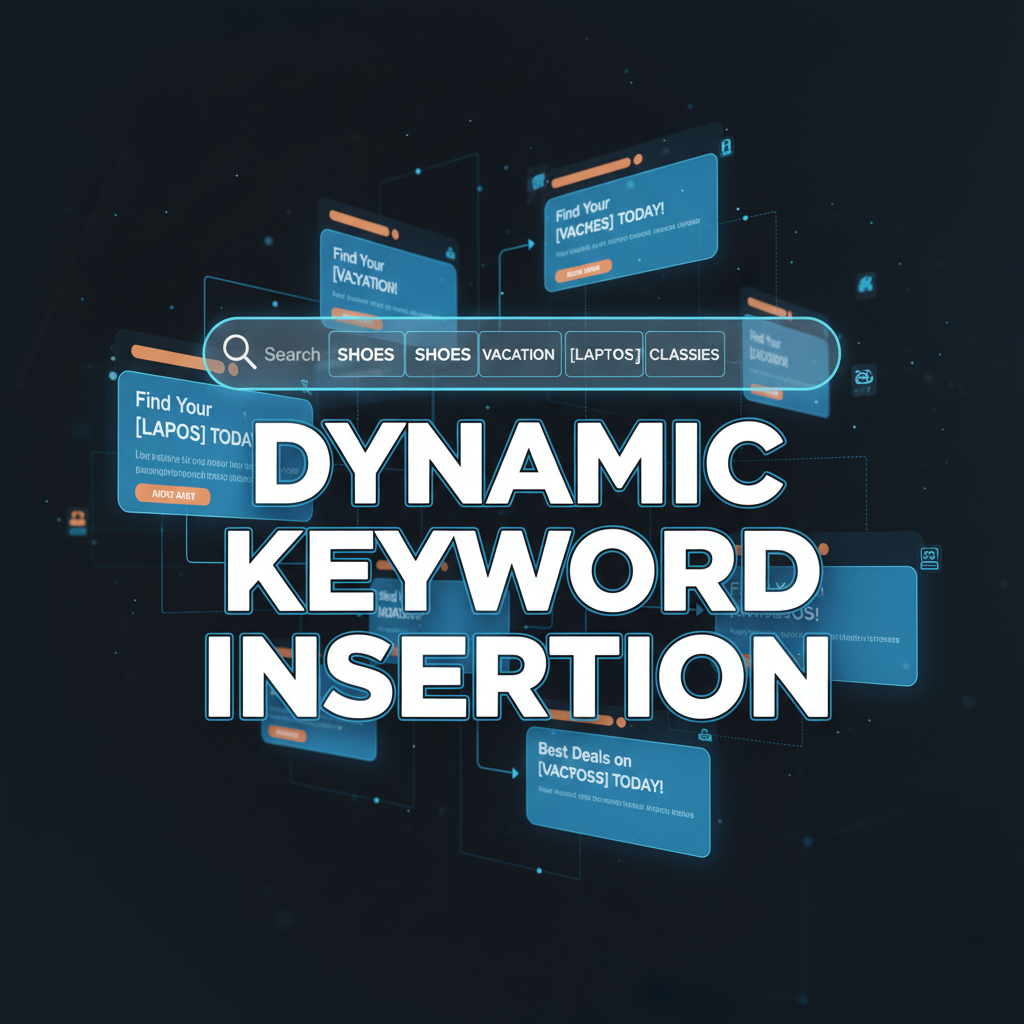
Think how great it will be if we succeed in matching the headline with our customer’s search term. And the great news is we can do it through the way of dynamic keyword insertion.
Dynamic Keyword Insertion
Based on the searcher’s query, dynamic keyword insertion facilitates the real-time replacement of a placeholder within your ad copy with a relevant keyword.
For example, if you are advertising a chocolate shop, and this is your keyword list,
- Gourmet Chocolate Truffles
- Dark Chocolate Bars
- Sugar-Free Chocolates
- Artisan Chocolate Gifts
- Belgian Chocolate
Your keyword insertion can look like that: “{KeyWord:Chocolate}.”
The Goal: Google Ads tries to replace the placeholder ({KeyWord:Chocolate}) with the keyword that triggered your ad.
Example 1: If a user searches for “sugar free chocolate,” and that is one of your keywords, your headline will likely become: sugar free chocolate.
The Safety Net (The Default Word): If, for any reason, Google Ads cannot insert a relevant keyword—perhaps the keyword is too long for the headline space, or the search was for something you didn’t specifically list—it will use the word you put after the colon.
-
- In your example, the “safety net,” or default text, is “Chocolate.”
- Example 3: If the keyword is too long, the system falls back to the default, making the headline: Chocolate
You can make your headline more perfect if you add something in front of the headline or after the placeholder.
Example: Buy {KeyWord:Chocolate}
The first word, “Buy,” will be always in there so if anyone searches “sugar free chocolate” and that is one of your keywords then your dynamic headline will be like that: “Buy sugar free chocolate”
But for any technical reason or if the search term is longer than 30 characters, then Google will show the default one.
You can see this example provided by Google.
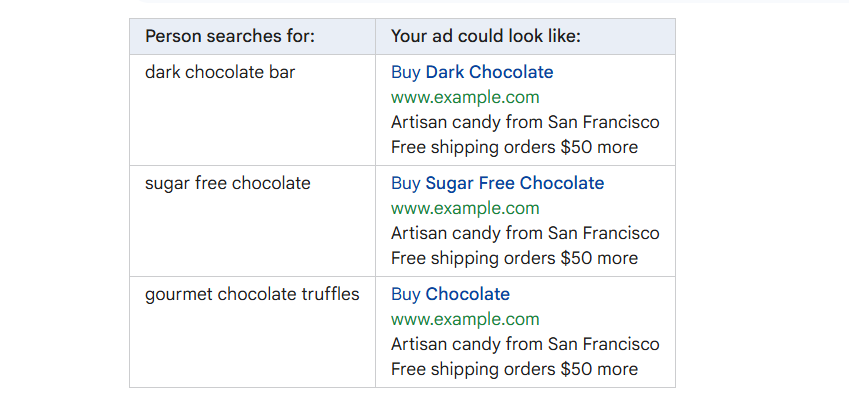
In the last example, “Chocolate” goes in the headline because the keyword “gourmet chocolate truffles” is too long to fit.
Setup Keyword Insertion
You can set up this keyword insertion in your ad copy. Like the way.
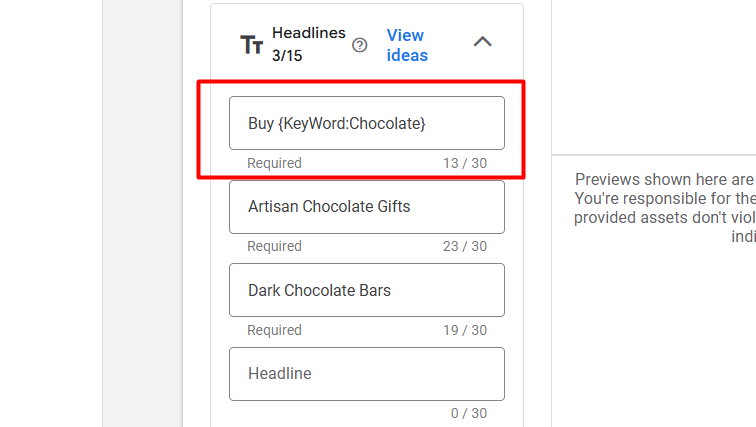
First, from here, select one box, then type the third bracket “{,” and then all options will be visible for you.
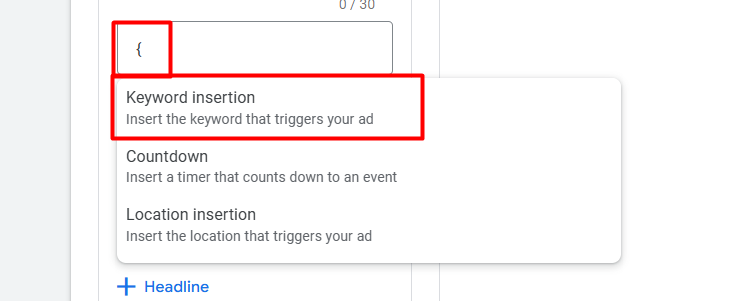
Now from here, select the first option.
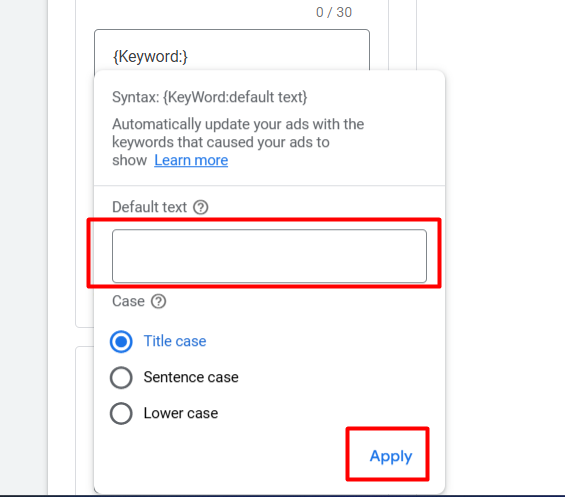
Now here in the box, place your default text. Here in the box, always try to add the main keyword for your goods.
- Title case: Capitalizes the first letter of every major word. This is usually the best choice for ad headlines because it looks professional and stands out.
- Sentence case: Only capitalizes the first letter of the first word (like a normal sentence).
- Lowercase: Makes all letters lowercase. This is rarely used in ad headlines, as it looks less official.
When setting up keyword insertion, we must be highly conscious of the 30-character limit imposed on ad headlines. While it is highly effective to enhance our keywords by placing a strong Call-to-Action (CTA), like “Shop” or “Buy Now,” either at the beginning or end of the ad copy, this fixed text is always present and consumes valuable space.
Since the length of the inserted keyword can vary, we must ensure that even our longest keyword, when combined with the static CTA text, does not exceed 30 characters. If the combined length surpasses this limit, the ad copy will not display the specific keyword, and Google will automatically revert to the generic default text, making the ad less personalized and less effective. Therefore, meticulous planning of the longest possible keyword length alongside any fixed text is essential for successful DKI implementation.
If you think that if you add any CTA in the first or last or at a time that can create a problem, then you can avoid it and go with the way.

In an ad copy, one DKI implementation is enough because if you use double, it can give you back the same line in an ad copy. I don’t think you will like it if your ad copy shows the same line, so do one.
We know that if something has a good side, it definitely can have a bad side also. Let’s talk about it.
The good and bad side of Keyword Insertion
Dynamic Keyword Insertion (DKI) is a powerful tool with significant potential, but it requires careful management.
When used correctly, this feature can dramatically increase your ad’s Click-Through Rate (CTR) by creating ad copy that is hyper-specific to the user’s search query, a clear advantage.
Furthermore, Google automatically bolds the dynamically inserted terms, making your ad stand out on the Search Engine Results Page (SERP).
However, the major caveat is that DKI must be used responsibly; while its precision offers better targeting, irresponsible use—such as inserting trademarked or inappropriate terms—can lead to serious issues, including legal liability.
Something like in your keyword group, you add some keywords with the name of your competitor. In the place of keyword groups, it’s not bad, but when it comes to the ad copy, then it violates the Google policy. So you have to be careful about that.